记住密码和自动登录的逻辑

记住密码和自动登录

每次点击登录按钮时触发相应的函数,这里为了简便我直接将用户名、密码等登录所需要的信息存进了localstorage中,事实上这是很危险的,好一点的一定要做好加密。
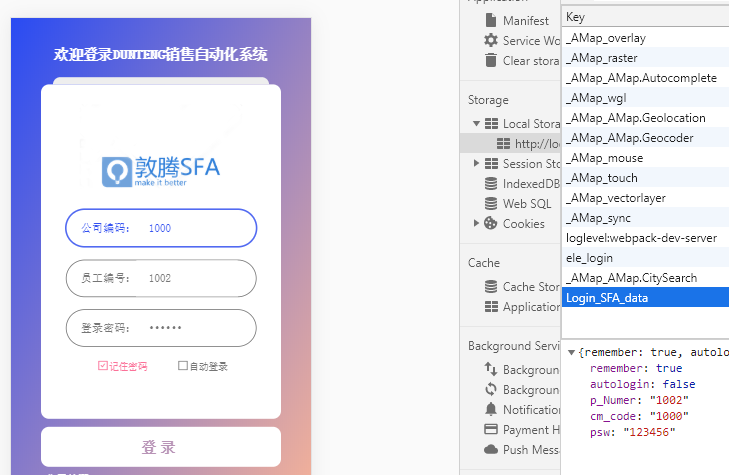
存入缓存:

1
2
3
4
5
6
7
8
9
10
11
12
13
14
15
16
if (res.data.code == 1) {
// 登录成功
// 记住用户密码
localStorage.setItem(
"Login_SFA_data",
JSON.stringify({
remember: this.remember,
autologin: this.autologin,
p_Numer: this.remember ? this.p_Numer : "",
cm_code: this.remember ? this.cm_code : "",
psw: this.remember ? this.psw : ""
})
);

this.$router.push("/home");
}

在每次页面挂载的时候,就取缓存,并显示在表单中:

1
2
3
4
5
6
7
8
9
10
11
12
13
14
15
16
17
18
mounted() {
let data = JSON.parse(localStorage.getItem("Login_SFA_data"));
if (data) {
this.cm_code = data.cm_code;
this.psw = data.psw;
this.p_Numer = data.p_Numer;
this.autologin = data.autologin;
this.remember = data.remember;
} else {
this.p_Numer = this.$route.query.p_Numer;
this.cm_code = this.$route.query.cm_code;
}


if (this.autologin) {
this.login(); // 方法就是登录
}
},

自动登录这一块还可以做些其他的操作,比如通过判断当前时间和缓存记录的时间差是否 间隔了一定的时间,若超过了规定的时间就取消自动登录,要求重新输入密码再登录。